Evidence note: Use this review to build a shortlist. We publish a numerical score or final recommendation only after the product completes the same hands-on scenarios and exception tests used for its peers.
The short verdict
Jotform is a strong evaluation candidate for local service businesses that need customer request forms, inspection checklists, consent, uploads, notifications, PDFs, and automation handoffs without writing custom software. It is most valuable as a controlled intake and evidence layer. It does not replace dispatch, technician status, job costing, invoicing, or the financial system of record.
Ready to test this fit? Reproduce your real intake, follow-up, handoff, and export workflow before choosing a paid plan.
Test Jotform for your workflowWho it fits
Small and midsize service businesses that need flexible intake, inspection, approval, or proof forms and already know which operational system should receive the resulting record.
Watch closely: The builder can create a useful first form quickly, but conditional logic, notifications, integrations, exports, permissions, retention, and paid-plan limits still require explicit testing. A form that captures a request is not proof that the job was scheduled or completed.
What changed on 18 Oct 2026
We reconciled this review with the later controlled intake record: two stored fictional submissions, one administrative notification receipt and inspected PDF and CSV files. We also rechecked current Starter limits, added export and deletion sources, and added three original diagrams plus a vendor export tutorial. No new account test was run today; the H1 and commercial verdict remain unchanged.
The buying answer
Jotform is a useful candidate for flexible intake, uploads, consent, approvals and an owned handoff. It does not replace dispatch, technician status, job costing, invoicing or the financial system. The buying risk is treating a submission or an email as completed operational work.
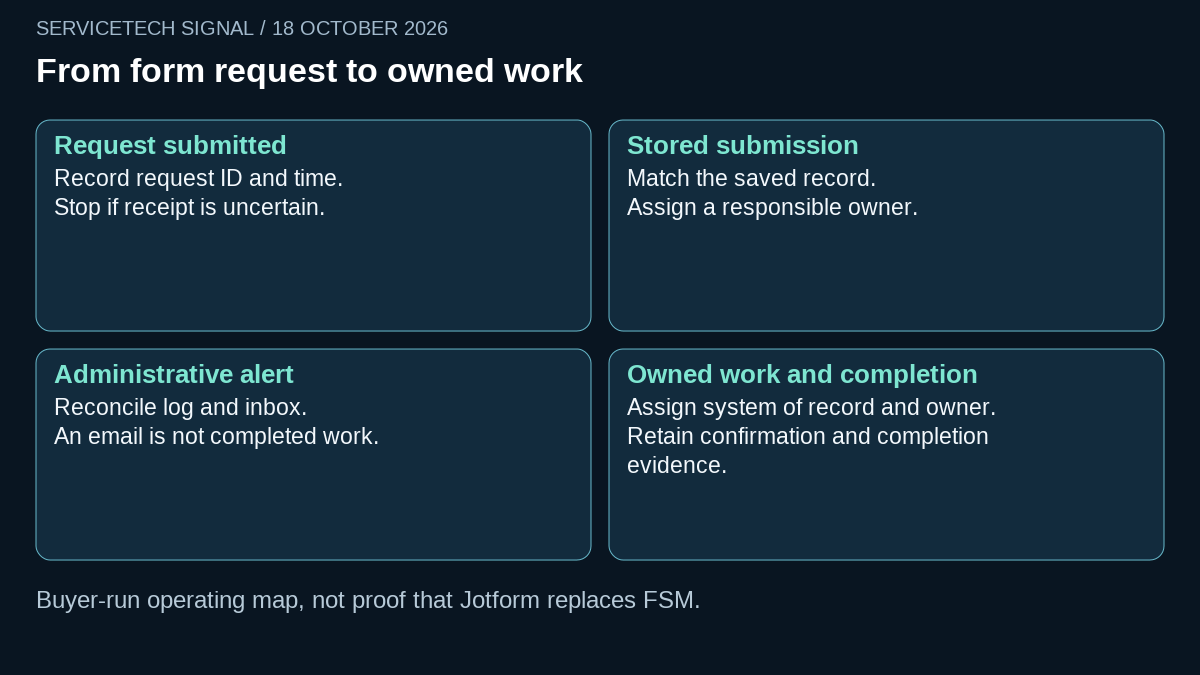
Match the request and stored submission by ID and time, reconcile the administrative alert, then name the owner and operational system. Retain confirmation at each handoff and completion evidence at the end. If a stage is missing, stop and reconcile rather than creating duplicate work.
Observed, documented and still open
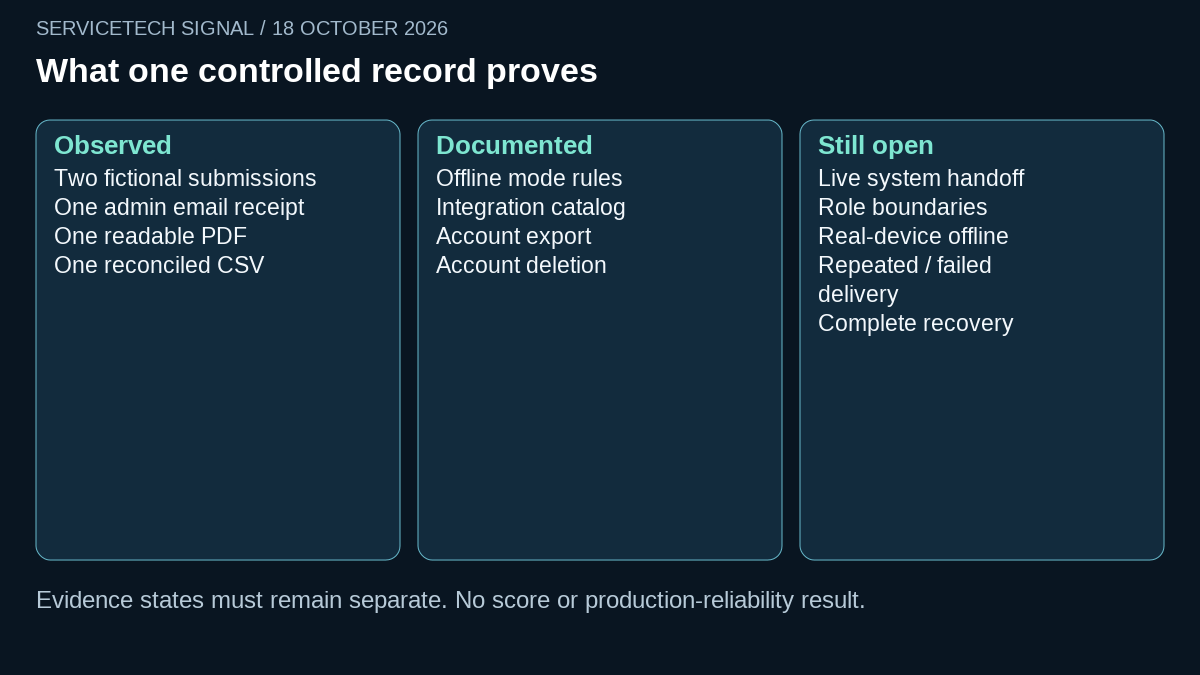
| Evidence state | What belongs here | Boundary |
|---|---|---|
| Observed | Two fictional submissions; one administrative Inbox receipt; one readable A4 PDF; one strict-valid 18-column CSV. | One controlled path, not production reliability. The initial emergency branch failed and roles remain Conditional. |
| Documented | Mobile offline rules, integration catalog, account export and deletion controls. | Vendor capability is not a ServiceTech outcome. |
| Still open | Live CRM/FSM handoff, role boundaries, real-device offline, repeated or failure delivery, complete exit and recovery. | No customer autoresponder, upload case or post-cancellation result was proved. |
The later notification arrived one minute after the observed record in that single test. It is not a latency promise or SLA. The PDF had two cosmetic, non-blocking defects. The CSV was UTF-8 with BOM, 18 unique columns and one reconciled record, but lacked form ID, submission ID and time of day. Keep provenance beside those artifacts. The original Copilot emergency branch remains a failed initial pass requiring manual logic verification.
Dated plan and capability checkpoints
Official pricing, checked 18 Oct 2026, supports the Starter limits below. It is a dated checkpoint, not an unlimited plan or permanent budget. The Mobile Forms offline guide describes app-specific rules; mobile-width rendering does not prove real-device offline recovery.
Notification setup and notification versus autoresponder settings describe configured behavior, not a general receipt result. The integration catalog establishes available destinations, not a successful live handoff. Review the security documentation and data processing addendum for your requirements; this review makes no compliance determination.
Export is not exit
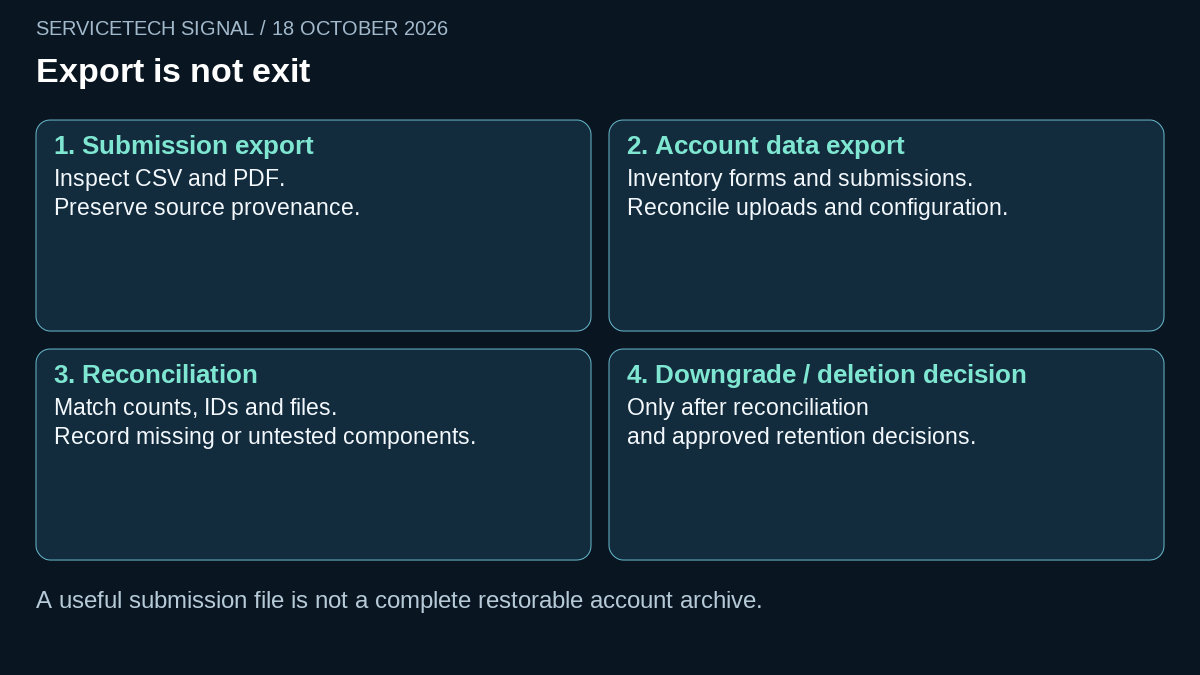
Submission export documentation covers CSV, Excel and PDF. Account data export is a separate operation. Inventory forms, submissions, uploads and configuration, then reconcile counts, IDs and files. Only after reconciliation and approved retention decisions should you plan downgrade or account deletion. A useful submission file is not proof of a complete restorable account archive.
How to Download Form Submissions As PDFs and Other File Types
YouTube connects only after you choose to load this video.
Buy against an owned sequence
- Validate the exact form and plan limits.
- Observe a safe authorized submission and reconcile the alert.
- Prove the handoff into the named system of record.
- Inspect CSV and PDF, then run account data export separately.
- Reconcile forms, submissions, uploads and configuration before planning downgrade or deletion.
Use the bounded intake record for implementation evidence, the notification diagnosis for missing alerts, and the file-access guide for uploaded links. The form-builder comparison owns selection alternatives; build versus buy owns the broader operating-system decision.
Pricing and plan gates
Starter checkpoint checked 18 October 2026: free, 5 forms, 100 monthly submissions, 1 user, 100 MB available space, 10,000 monthly form views, 500 total submission storage, 100 fields per form, 10 monthly payment submissions, 10 monthly signed documents and Jotform branding. These are dated limits, not a permanent production budget. Confirm the intended market, renewal term and required paid gates before purchase.
Evaluation access: A verified Starter account created and stored the controlled test form without requesting payment details. Treat Starter as a bounded pilot tier rather than an unlimited production plan.
- Model monthly form views, submissions, uploads, stored records, payment submissions, and collaborator count.
- Confirm whether the intended form, branding, storage, payment, approval, and compliance controls fit the selected plan.
- Name the system that owns the customer, job, invoice, and deletion record before enabling an integration.
- Capture paid pricing, currency, tax, renewal terms, and export rights on the purchase date.
Affiliate disclosure: ServiceTech Signal participates in the Jotform affiliate program and may earn a commission if you sign up through this link. The relationship does not change our test record, caveats, or editorial conclusion.
Strengths and constraints
The strongest documented signals
- Form Copilot produced a coherent service-request structure from one detailed prompt
- The test form captured service type, urgency, scheduling, property access, consent, and supporting details
- An empty submission triggered nine required-field errors before the record could be stored
- The controlled phone-width view showed no horizontal overflow across the tested form
- Two authorized fictional submissions were stored; the second supports one observed administrative notification receipt, not a delivery rate.
- The authenticated integration catalog exposed CRM, finance, storage, automation, and webhook destinations
- Jotform Mobile Forms documents offline collection and later synchronization for compatible forms
The constraints to price and test
- The initial AI-generated form omitted the requested emergency follow-up branch
- One administrative notification reached Inbox; repeated delivery, customer autoresponder, spam handling, reply ownership and failure recovery remain untested.
- One readable PDF and one reconciled CSV were inspected, but complete account export, configuration, uploads and post-cancellation recovery remain open.
- No live CRM, finance, storage, or automation integration was connected
- Starter has one user and material form, submission, storage, field, and payment-submission limits
- Some widgets require connectivity, and offline behavior depends on the Jotform Mobile Forms app and device storage
- Jotform does not provide the dispatch, technician, job-costing, invoice, and accounting lifecycle of a full field service platform
What we tested directly
These checks used a controlled ServiceTech Signal QA account, synthetic customer data, and no real customer payment.
AI-assisted form build
Form Copilot created the core request structure, but the requested emergency follow-up logic was missing and remained a manual QA item.
Mobile-width completion
The controlled phone viewport preserved access to every tested control without horizontal overflow.
Required-field validation
An empty submit produced nine validation errors before the form accepted a record.
Fictional submission
Two authorized fictional plumbing requests were stored. No real customer data, payment or live integration was used. The later validation extends the earlier single-submission record rather than replacing its history.
Notification setup and administrative receipt
The second authorized submission generated a matching administrative notification that reached the configured Inbox one minute after the observed submission. This is one case, not an SLA, delivery rate or repeat-reliability result. The email-preview timestamp differed by six hours and was not silently normalized.
Portability controls
One one-page A4 PDF was readable and reconciled, with two non-blocking cosmetic defects. One strict-valid UTF-8 CSV with BOM, 18 unique columns and one record was parsed and reconciled. The CSV omitted form ID, submission ID and time of day; provenance is required. The PDF filename retained the submission ID but the PDF did not embed the form ID. Neither artifact proves a complete account archive.
What we still need to test
- Build and manually verify the missing emergency branch across every urgency choice; the initial Copilot pass failed this control.
- Exercise role boundaries with authorized distinct users; the historical role control remains Conditional.
- Complete a real-device offline sequence and reconcile queued records and timestamps.
- Test repeated administrative delivery, failure recovery, spam and reply ownership, plus customer autoresponder delivery separately.
- Connect an authorized sandbox handoff and test create, edit, duplicate, disconnect and failure paths.
- Run account data export separately, reconcile forms, submissions, uploads and configuration, and establish complete-exit and post-cancellation recovery before a retention or deletion decision.
Evidence sources
- Jotform pricing and plan limits ↗
- Jotform Mobile Forms offline guide ↗
- Jotform integrations catalog ↗
- Jotform form notifications ↗
- Jotform security and data controls ↗
- Jotform data processing addendum ↗
- Submission exports: CSV, Excel and PDF ↗
- Account data export ↗
- Account deletion boundary ↗
- Setting up administrative email notifications ↗
- Notification and autoresponder settings ↗
Editorial record
Who reviewed this page and what happens next.
Commercial relationships cannot change the evidence state, fit statement, caveats, or conclusion.
- Research and review
- Andre Ribeiro
- Published
- Last material review
- Next scheduled review
- Evidence scope
- Worldwide web access; device, offline, payment, privacy, and data-residency requirements need market-specific validation
- Evidence state
- Direct / Intake scenario
Testing methodologyEditorial standardsCorrections and update log
ServiceTech Signal participates in the Jotform affiliate program and may earn a commission if you sign up through this link. The relationship does not change our test record, caveats, or editorial conclusion.
Start a controlled Jotform evaluation