Evidence note: This comparison combines direct evidence records for Jobber and Tradify, but it does not assume identical market availability. Jobber is evaluated through a North American buying lens. Tradify offers worldwide core-product access with region-specific commercial and workflow limits. No numerical score is assigned while material mobile, payment, and exception controls remain open.
Which should you evaluate first?
Jobber is the safer first evaluation for a North American team that values iOS/Android field access, bounded offline capture and team-size/term packaging it can normalize. Tradify is the safer first evaluation for a region-supported trade business that prefers per-active-user pricing and can accept an internet-dependent web/mobile workflow while validating plan, communications, accounting and export limits. Neither is a universal winner.
A vendor's availability statement is not proof of your tax, messaging, payment or accounting configuration. Start with the operating country and required field tasks, then compare one written scope. The Jobber review and Tradify review own deeper single-product evidence.
What changed on 31 October 2026
We rechecked current pricing, billing, mobile, recurring-job, accounting and exit documentation. This update adds a normalized buying worksheet, explicit connectivity and recovery boundaries, three original diagrams and a consent-first official Tradify video. The useful earlier decision table, unresolved evidence and source destinations remain below.
Methodology: these are vendor documentation and buyer-run proposed checks, not new ServiceTech account results. No authenticated tenant, customer, payment, accounting, mobile/offline, import, export or migration scenario was run for this refresh. Historical direct evidence remains historical. Vendor trials, testimonials and videos do not establish reliability, savings or a matched winner. See methodology and the evidence ledger.
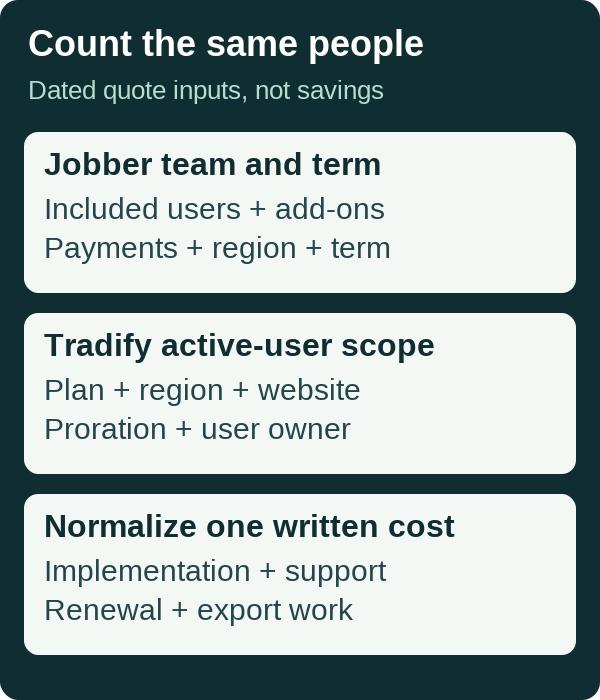
Team-size and term pricing versus active users and region
Checked 31 October 2026: Jobber pricing separates Core, Connect, Grow and Plus by team-size band and billing choice. Capture the standard price, included users and optional products for the selected country/currency. Its subscription guide, updated 29 October 2026, distinguishes no-commitment monthly billing, monthly payment with a one-year commitment and annual prepay. Do not freeze a temporary promotion as the normal renewal price or invent an extra-seat charge.
The selected Tradify USD pricing page shows Lite USD 47, Pro USD 51 and Plus USD 61 per user/month, Custom by request, and optional Instant Website USD 12/month. These are dated USD checkpoints, not UK, NZ, Australian or EU quotes. Confirm tax, billing term, each required feature and the actual purchase screen; the all-feature trial does not establish paid-plan inclusion.
Tradify monthly billing guidance, updated 11 May 2026, describes billing in arrears with proration for user-count and plan changes. Require the quote to define which users count as active, when activation/deactivation changes billing and how any annual offer differs. The current terms page combines product-specific and Access Group terms and assigns management of user levels to the customer. Do not treat an archived terms document as the current contract.
| Input | Jobber | Tradify |
|---|---|---|
| Paid capacity | Plan, team band, included/extra users and office/field permissions. | Lite/Pro/Plus/Custom, active users, subcontractor treatment, proration and deactivation owner. |
| Term and region | Country/currency/tax, commitment, payment frequency, normal renewal and cancellation. | Same inputs, regional purchase page, monthly versus any separately quoted annual terms. |
| Required workflow | Dispatch, recurring work, forms, time capture, QBO, reports and optional products. | Recurring jobs, reminders, timesheets, forms/certificates, purchasing and accounting gates. |
| Other cost lines | Payments, communications, AI/marketing, connected apps, hardware, setup and training. | Website, messaging, payment processing, integrations, devices, migration and training. |
| Support and exit | Support/SLA, export permissions/components, retention and post-term access. | Same controls, individual downloads/support requests, template rebuilds and cancellation cutoff. |
Use the pricing FAQ and plan-inclusion guide as supporting documentation, then get current written scope. Normalize one, three and ten required users using your own workload and the total-cost calculator. This is a purchase method, not a savings forecast.
Mobile and offline: a queue is not a reliability result
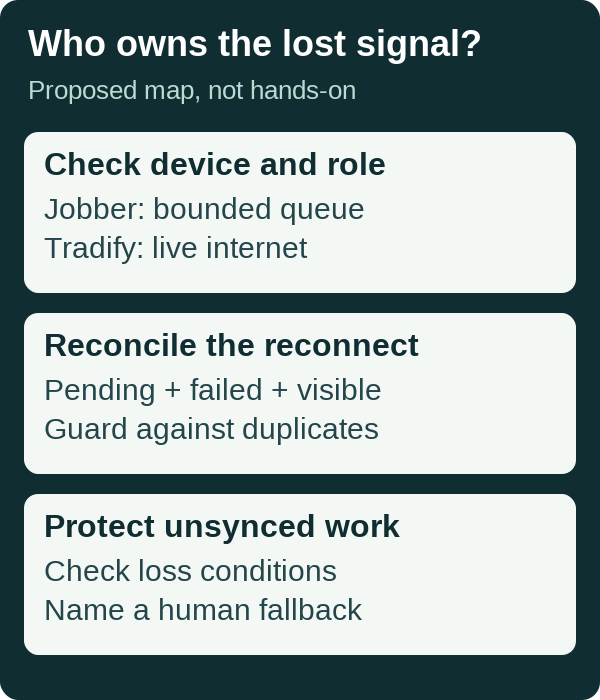
Jobber's product overview describes iOS/Android field access. Its notes and attachments guide, updated 22 October 2026, documents local storage and pending/uploading/failed entries in Sync Queue. A note and its attachment sync when internet returns and the app is open; teammates cannot see the local note before that. Logging out, deleting, force closing or updating the app while a note awaits sync loses that note, according to the guide.
Jobber timer guidance separately describes local offline timer data and reconnect sync, but geofenced timers need internet. Do not generalize one supported action to every job form, attachment or operation. Preserve the queue before following any reset/update advice; Jobber troubleshooting guidance is not proof that unsynced work survives each repair.
Tradify's explicit offline FAQ, updated 5 August 2024, states that both Web Console and Mobile App depend on a live internet connection. Its device guidance describes iOS/Android access, not offline write/recovery support. Do not infer an offline queue from a cached screen or a successful online demonstration.
Proposed device check: freeze iOS/Android app versions and two authorized roles. Open the same records online; interrupt connectivity; attempt only permitted actions; record queued, blocked or failed work. Reconnect with the app open, inspect shared visibility, timestamps, attachments, duplicates and a controlled concurrent edit. Name the human fallback before retry or reset. For Tradify, plan an online connection or a separately reconciled temporary record rather than assuming offline capture. See the offline field-service guide.
How Tradify Works
YouTube connects only after you choose to load this video.
Scheduling and recurring work need an exception owner
Tradify recurring-job guidance, updated 12 August 2026, distinguishes a template from generated jobs: editing an existing job does not change the template, while template changes apply to future generated jobs. It also distinguishes create-and-schedule, create-and-assign and create-only paths. Verify which outcome is required, not just whether a recurring feature exists.
Run the same fictional enquiry, quote, recurring visit, weather delay, urgent insert, cancellation and reassignment in both intended plans. Record the job owner, scheduled time, customer promise, duplicate guard, notification and manual fallback. A generated job or a reminder does not prove the technician received the final change.
Tradify's country guidance states worldwide use but warns about grouped-tax support and some address lookup limitations. The text-reminder countries page lists New Zealand, Australia and the United Kingdom. Broad product access is not proof that a required tax, SMS, payment or accounting feature works in your region. Confirm destination countries, charges and eligibility before purchase.
QuickBooks correction: reconcile objects, not a connected badge
Jobber's QBO setup guide is scoped to a new integration rollout, select plans and US/Canada availability. Its error/correction guide, updated 29 October 2026, separates blocking errors from warnings where an item synced with changes. Identify new versus legacy integration and inspect the exact correction procedure.
Tradify's QBO guide, updated 17 March 2026, requires account codes for labour, materials, bank and purchases; unmapped price-list items can be absent from QBO invoices. QuickBooks Self-Employed is not usable with this integration. Options cover invoice numbering, attached files and inventory-item handling; customer, supplier and price-list imports are separate documented steps. Confirm each object direction rather than assuming a round trip.
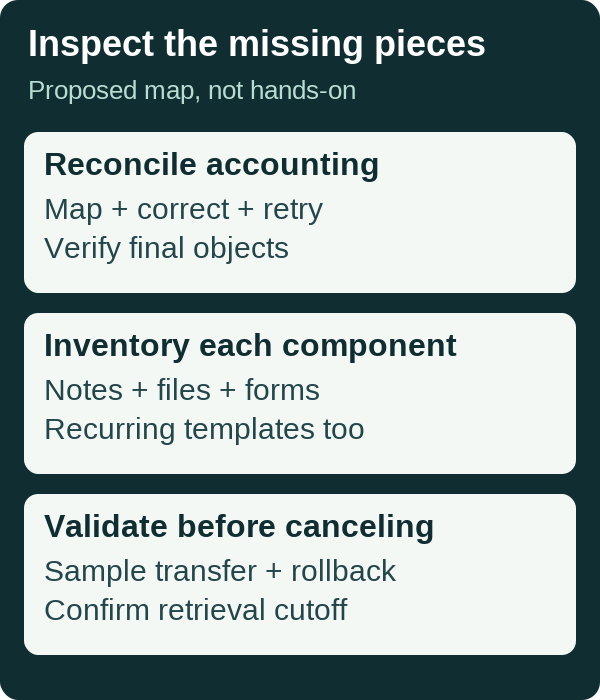
Use fictional data to send an invoice, force one reversible mapping/validation problem, correct and retry, then reconcile invoice, tax, payment, credit/refund, fees and payout records in both systems. Inspect duplicates, status, IDs and audit history. Assign a final system of record and correction owner. No financial or accounting test was run by ServiceTech today.
If Xero is required, use its separate regional integration guidance and removal guidance. Tradify documents support-assisted disconnection and warns that previously linked two-way invoices cannot re-establish that connection after reconnect. Verify the exact recovery path before using disconnect as a routine fix.
Exports, migration and cancellation: inspect the missing components
Jobber client export is plan/permission-gated CSV/vCard data with batching at up to 1,500 rows. Reports and the one-off jobs report cover selected objects, columns and filters. These are component surfaces, not proof of every file, relationship or configuration.
Tradify export guidance, updated 14 September 2026, says ordinary job/quote/invoice exports omit notes and files. Those require individual downloads or a support request for a full copy. Forms & Certificates and Service Reminders lack bulk export. Generated jobs can appear in jobs exports, but recurring-job templates cannot be exported. Inventory these gaps before agreeing a migration.
| Component | Buyer evidence | Stop signal |
|---|---|---|
| Clients, sites, jobs, quotes and invoices | All required rows/fields, stable IDs, relationships, dates and reconciliation totals. | A filtered report is treated as the whole account. |
| Payments, credits, bills and timesheets | Named export paths and final accounting-object/status reconciliation. | Balances or relationships cannot be rebuilt. |
| Notes, files, forms and history | Downloads/support scope, attachments, communications, activity and timestamps. | Bulk export is assumed despite documented exclusions. |
| Templates and configuration | Recurring templates, reminders, permissions, automations, mappings and rebuild owner. | No plan for components that do not export. |
| Cancellation and retrieval | Authorized owner, export/access cutoff, retention/deletion and written assistance terms. | The account is canceled before sample migration and restore-gap review. |
Jobber cancellation guidance says access ends with the billing period or committed term. Permanent closure is a separate account-owner action with retention exceptions. Tradify cancellation guidance, updated 5 April 2026, says the account is inaccessible after cancellation and information must be exported first. No post-exit retrieval guarantee is established here.
Require a sample import, counts, balances, file/relationship checks, a freeze window, rollback and a component restore-gap review before live migration. Vendor import assistance or a collection of CSVs does not prove a complete restorable exit archive. Confirm controlling retention and cancellation terms in writing; this is a buyer checkpoint, not legal advice.
Same-scenario protocol: keep, switch or do not buy yet
- Normalize the exact plan, team or active-user count, region, term, proration, payment fees and optional products.
- Run one fictional enquiry-to-payment workflow, a recurring template and the same scheduling exceptions in each intended plan.
- Check online dependency, permitted offline actions, queue failures, shared visibility and safe reconnect on both device roles.
- Run the fictional accounting correction/retry and inspect final objects, duplicates and ownership.
- Collect each export/download, validate a sample transfer, document restore gaps and agree rollback before cancellation.
Keep the current system if it meets the controls and a replacement has no verified fit advantage. Switch only after the purchased configuration passes your shared pilot and migration gates. Do not buy yet if connectivity, regional eligibility, correction ownership or exit coverage remains unresolved.
Use the Jobber workflow test, Tradify workflow test, QuickBooks integration guide, pilot guide, pilot scorecard and migration checklist for detailed methods. This comparison owns the pair decision, not those broader protocols.
The decision in one table
| Decision factor | Jobber | Tradify | How to decide |
|---|---|---|---|
| Market posture | North American evidence desk with US and Canada buying assumptions | Vendor states the core product can be used in any country | Start with the operating country, not the feature list |
| Published price signal | From $29/month on annual billing; price changes with plan and team size | Global English page lists Lite at $47, Pro at $51, and Plus at $61 per user/month; regional pricing can differ | Model the same users, currency, tax, term, and add-ons |
| Trial | 14 days with no card | 14-day all-feature trial with no card, verified in the direct test | Run one shared week of work |
| Field access | iOS and Android field access | Web, iOS, and Android access | Measure completion time on the actual devices |
| Core workflow | Clear request, quote, job, invoice, payment, and client path | Enquiries, quotes, jobs, recurring work, invoices, files, timesheets, and accounting connections | Match the workflow that already creates delays |
| Main buying risk | Team-size pricing, plan gates, automation, and optional products | Regional tax, grouped-tax, SMS, payments, accounting, support, and export boundaries | Close the regional and plan-specific gaps before purchase |
The lighter path fits the actual operation.
- The business primarily operates in the United States or Canada.
- A legible request-to-payment baseline matters more than a wider configuration surface.
- The team needs full field access across both iOS and Android.
- The intended Jobber plan passes the job-costing, automation, accounting, and add-on checklist.
The additional capability has a current owner and return.
- The business must evaluate a system outside North America without misrepresenting its location.
- A small trade business wants enquiries, recurring work, files, timesheets, and accounting connections in one system.
- An all-feature trial is useful for mapping the real workflow before selecting a plan.
- The buyer can verify local pricing, tax, SMS, payments, accounting, support, and export behavior in writing.
Evidence still unresolved
- Same-account completion time across the shared eight-scenario test week
- Native-device behavior under weak connectivity
- Deposit, refund, and accounting correction parity
- First-year and third-year cost for the same team
- Complete export, retention, and support-response comparison
Continue the research
Primary sources
- Jobber pricing and plan controls ↗
- Jobber crew scheduling limits ↗
- Jobber automated job costing ↗
- Jobber record activity and history feeds ↗
- Jobber job-costing documentation ↗
- Jobber QuickBooks Online setup ↗
- Jobber request workflow ↗
- Jobber quote creation and conversion ↗
- Jobber quote approvals and change requests ↗
- Jobber mobile invoicing ↗
- Tradify global pricing and plan comparison ↗
- Tradify worldwide country-availability statement ↗
- Tradify France product and trial surface ↗
- Tradify signup and no-card trial ↗
- Tradify terms and termination export promise ↗
- Tradify text-message regions and history export ↗
- Tradify recurring-jobs workflow ↗
- Tradify percentage invoice workflow ↗
- Tradify credit-note boundary ↗
- Tradify accounting boundary ↗
- Tradify quote reminder rules ↗
- Tradify invoice reminder rules ↗
- Tradify email activity evidence ↗
- Tradify text-reminder country limits ↗
- Tradify duplicate-customer correction ↗
- Tradify staff permissions ↗
- Tradify CSV export coverage ↗
- Tradify Xero removal and relink boundary ↗
- Tradify support request form ↗
- Tradify cancellation and pre-cancellation export guidance ↗
- Tradify partner programme ↗
Editorial record
Who reviewed this page and what happens next.
Commercial relationships cannot change the evidence state, fit statement, caveats, or conclusion.
- Research and review
- Andre Ribeiro
- Published
- Last material review
- Next scheduled review
- Evidence scope
- Worldwide readership with market specific product evidence
- Evidence state
- This comparison combines direct evidence records for Jobber and Tradify, but it does not assume identical market availability. Jobber is evaluated through a North American buying lens. Tradify offers worldwide core-product access with region-specific commercial and workflow limits. No numerical score is assigned while material mobile, payment, and exception controls remain open.
Testing methodologyEditorial standardsCorrections and update log