Evidence note: This comparison uses current official pricing, product, partner, billing, and contract sources. Neither product has completed the shared ServiceTech Signal direct account test. Service Autopilot and WorkWave partnership enquiries remain pending, so this page contains no affiliate link and no commercial relationship influences the provisional decision.
What changed on 5 November 2026
Evaluate Service Autopilot first when recurring routes, job costing and governed automations fit a defined platform and its quoted plan, licenses and add-ons. Evaluate WorkWave first when a named current portfolio product matches the trade and the team can own its modules, implementation, contract and data exit. Neither is a universal winner. A larger portfolio is not one interchangeable application.
Method and evidence: Official pricing, support, product-status and contract sources checked 5 November 2026. Both sides remain Desk evidence; neither completed the same direct ServiceTech Signal account scenario. The original conditional verdict, cost checkpoints, decision factors, unresolved questions and sources remain below. Vendor documentation and video describe capability, not our route, sync, accounting, migration or customer results. The buyer checks below are proposed, not completed tests.
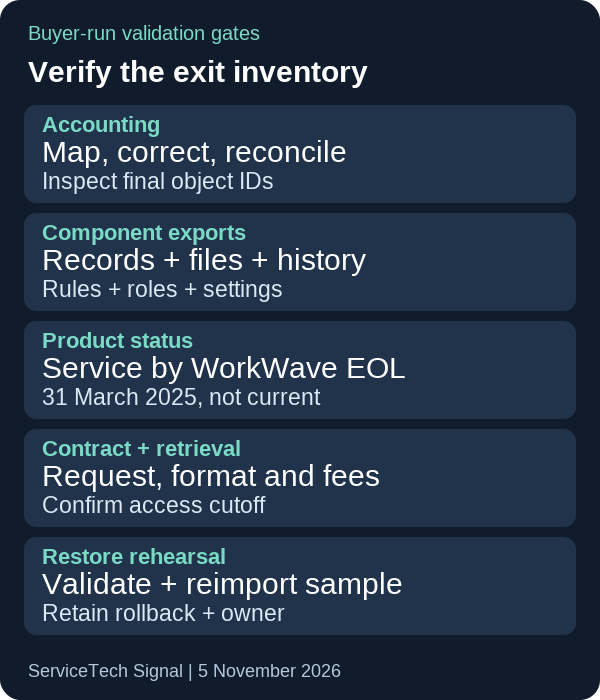
Product-status gate: WorkWave's discontinuation notice says Service by WorkWave, RealGreen Lite, PestPac Lite and TEAM Lite became inaccessible on 31 March 2025. Its listed 30 April 2025 backup-request deadline is historical and has passed. Do not buy or evaluate Service by WorkWave as a current alternative, or assume a backup remains available now. Name the replacement product and verify its current support and contract.
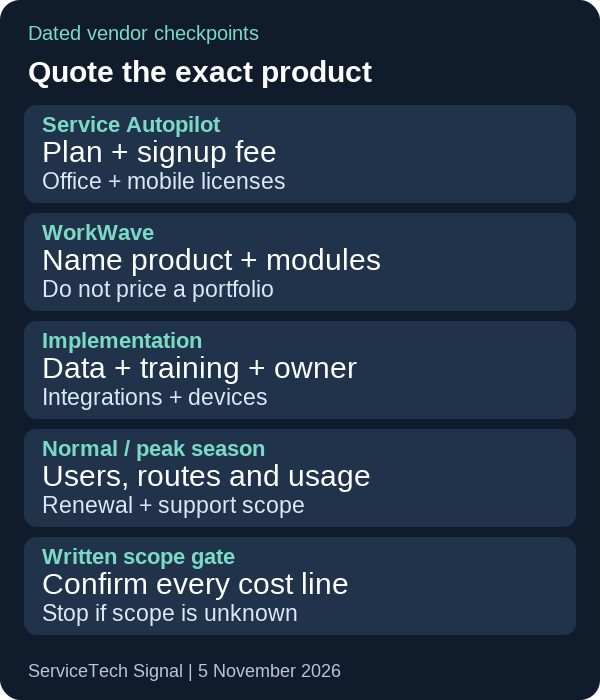
Normalize licenses, contracted scope and renewal cost
Service Autopilot pricing lists Startup USD49, Pro USD199 and Pro Plus USD499 per month on annual subscription rates, plus a sign-up fee where shown; Elite is contact-for-pricing. The table includes 1/1/1/2 business users and 1/2/5/8 mobile licenses respectively. Pro lists route optimization, dispatch calendar and job costing; Pro Plus adds Automations and Marketplace. Elite lists broader controls such as QuickBooks, texting and onboarding. Some comparison rows separately say call for pricing: obtain written inclusion and add-on terms, not a universal entitlement from a chart mark.
| Buyer input | Service Autopilot | Named WorkWave product |
|---|---|---|
| Operating unit | Startup/Pro/Pro Plus/Elite; required business and mobile licenses, roles, locations, routes and seasonal users. | Exact current product, version, modules, user/device/location billing units, supported country and platform. No portfolio-wide price is assumed. |
| Term and normal cost | Currency/tax/market, annual basis, signup, extra licenses, add-ons, usage, billing frequency, renewal increase and downgrade terms. | Order Form and applicable supplemental terms, currency/tax, commitment, renewal, minimums, usage, license changes and early termination. |
| Implementation and integrations | Import scope, setup, training, Automations/Marketplace, QuickBooks, payments, texts, maps, portal, support/SLA and admin ownership. | Migration, training, devices, integrations, payments, reporting/AI, support and product-specific services. No cross-product feature transfer. |
| Decision stop rule | Price the same normal and peak season workload, implementation and renewal year. Stop if any required role, module, integration, correction path or exit component has no written scope and owner. A headline subscription or demo is not total cost. | |
WorkWave billing guidance sends license changes to sales and says written cancellation requests should arrive 30 days before renewal where applicable. Its terms index links a Master Services Agreement and service-specific supplements. Match the actual Order Form before relying on renewal or cancellation rules. Use the cost calculator after the written scope is complete; no WorkWave dollar estimate or saving is invented here.
Give route exceptions and automation stops a named owner
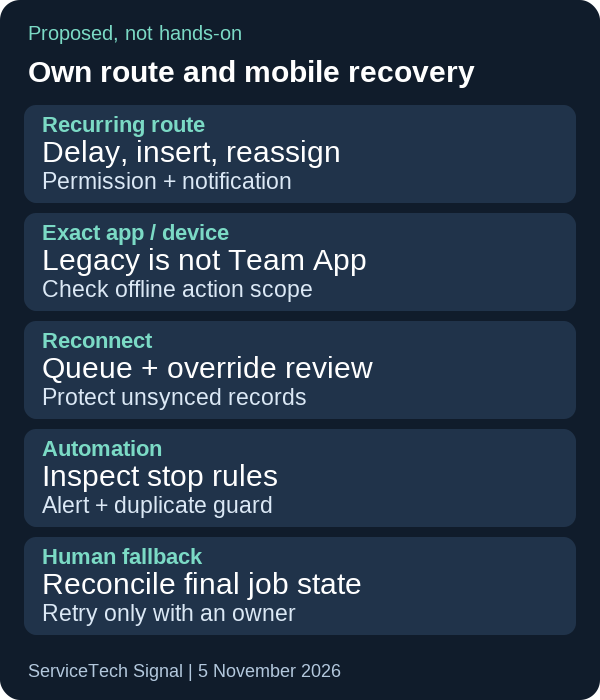
Use the same fictional recurring route, time windows and seasonal workload. Introduce a weather delay, urgent insert, cancellation, skip and reassignment. Confirm which operator can reorder work, whether constraints survive the change, who approves notifications and how office/field users acknowledge the final assignment. This is an evaluation protocol, not a measured route improvement.
The 16 October Service Autopilot release note says new Invoice/Estimate-triggered rules receive deleted-record stop conditions; existing Invoice-triggered automations were to be updated, while existing Estimate-triggered automations awaited a later hotfix. This release-note checkpoint does not prove today's tenant state. Audit one new and one existing rule of each type; inspect stop, retry, owner alert and any missing execution before enabling customer-facing sequences.
WorkWave automation, routing and AI controls depend on the named product and modules. Ask for its exact trigger, cancellation/deletion behavior, execution history, retry/duplicate guard and human fallback. Do not map a Service Autopilot rule or a WorkWave portfolio claim onto an unrelated application. Stop the purchase if nobody owns a delayed, duplicated or unstopped action.
Separate Legacy App behavior from Team App and WorkWave mobile
| Boundary | Service Autopilot | Named WorkWave product |
|---|---|---|
| Connectivity and conflict | The Legacy App sync guide requires internet for sync and queues offline updates. Legacy App changes can override Dispatch Board changes. Pull to Refresh updates only the current screen. | Require the exact app/device/version/role, preload rules, supported offline reads/writes, attachment queue, reconnect ordering and shared visibility. No portfolio-wide offline claim. |
| Recovery risk | Clean and Sync can lose unsynced pictures or timesheets. Preserve and reconcile outstanding work before following a vendor-supported recovery path. Do not transfer this behavior to Team App without its own source. | Require a demonstrated failed-sync path, duplicate/conflict review, data-loss boundary, audit trail and escalation owner for the actual product. |
| Stop rule | Do not accept a spinner or connected badge as completion. Compare the final assigned job, time, photo and office record after reconnect. If state is uncertain, pause automation and use an owned manual reconciliation path. | |
Reconcile accounting, then inventory export and exit
For QuickBooks or another ledger, name the supported connector/version and mapping owner. Proposed checks: one normal invoice, a failed correction and safe retry, duplicate number, partial payment, credit/refund, tax change and final balance. Compare accepted object IDs, fees and ledger totals. Require the selected WorkWave product's own accounting documentation; neither a portfolio logo nor a vendor video proves a round trip. See the accounting integration checklist.
Service Autopilot's cancellation FAQ promises export of critical data, not every file, relationship, automation or configuration. Its report/export matrix and V3 invoice export guide describe different surfaces and scope. The matrix lists Job Notes with no report, custom report or export path. V3 invoice output can be filtered and selected before export, then retrieved from My Day. A filtered report is not an account backup.
| Component | Required evidence before migration or cancellation |
|---|---|
| Clients, leads, jobs and visits | Unfiltered and filtered output; IDs, relationships, recurring work, schedules and history. List supported export, report-only and unavailable components separately. |
| Invoices, payments and accounting | Invoice lines, payments, credits/refunds, taxes, deposits, mapping and sync/error history; final finance reconciliation and connector disconnection. |
| Files and operational context | Photos, attachments, forms, notes, contracts, timesheets, services/packages, equipment and audit history. Verify actual bytes, links and missing components. |
| Configuration and restore | Automations, stop rules, roles, permissions, templates, integrations and settings. Reimport a synthetic sample with counts/amounts and retain rollback. Neither platform has proved a complete restorable archive here. |
| Term, EOL and access | Written cancellation/renewal notice, export request/format/fees, retention, deletion and post-termination access cutoff. Historic EOL deadlines are not current retrieval promises. |
The WorkWave EOL policy describes phased retirement and standard-format data access before cloud-product EOL; support may change or cost extra. That policy does not reopen the expired Service by WorkWave backup deadline. The linked January 2025 MSA makes the Order Form important: section 8.5 describes a content-backup request within 30 days after termination, fees paid, then-current export fee and vendor-chosen format, with no obligation to maintain/provide content after that period. Renewal and early-termination provisions are separate. Confirm the controlling product-specific agreement and exact dates in writing; this is not legal advice or a promise of a complete self-service exit.
One same-scenario protocol before keep, switch or do not buy yet
Proposed buyer checks, not completed tests: use authorized roles, synthetic records and isolated supported integrations. No authenticated account/customer/payment test was run for this refresh.
- Name the current WorkWave product and the Service Autopilot plan, licenses, modules and normal/peak workload. Obtain comparable implementation and renewal offers.
- Run the same recurring route and exceptions with a dispatcher and field role. Inspect stop rules and notification approval before any live sequence.
- Test the actual app/device online, offline where supported and after reconnect. Review conflicts, photos/timesheets, duplicate prevention and shared visibility with a named human fallback.
- Use an isolated accounting path to correct and retry fictional records; reconcile the final objects rather than counting success messages.
- Export every required component with the correct permissions, rehearse a synthetic restore/rollback and obtain written cancellation, EOL and retrieval deadlines before leaving the old system.
Keep the current system if it passes the required workload and cost controls. Switch only if a matched buyer-run scenario addresses the actual bottleneck and owners accept implementation/exit gaps. Do not buy yet if the WorkWave product, contracted scope, failed-action recovery, accounting correction or retrieval window remains unresolved.
Keep the separate owners intact: Service Autopilot review, WorkWave product map and Service Autopilot workflow protocol. Use the route-method guide, offline checklist, pilot guide, exit checklist, methodology, evidence boundary and scorecard for their own tasks.
Routing
Vimeo connects only after you choose to load this video.
Direct answer
Which one should you choose?
Choose Service Autopilot for a more legible product and plan decision around recurring field-service work. Choose WorkWave only after the exact portfolio product, modules, contract, and implementation scope match the business's vertical workflow.
Recurring-route operators that can map required features to Startup, Pro, Pro Plus, or Elite and normalize the signup fee, licenses, add-ons, and renewal cost.
Established vertical operators that need specialized depth and have the staff to evaluate, implement, and govern a product-specific WorkWave configuration.
Evidence boundary: Both records are based on official primary sources. ServiceTech Signal has not completed the same direct account workflow in either platform. Partnership enquiries are pending and no affiliate link is active on this comparison.
Evaluation options: Each link is identified as an official or partner path. Commercial relationships cannot change the evidence, caveats, or decision criteria.
The decision in one table
| Decision factor | Service Autopilot | WorkWave | How to decide |
|---|---|---|---|
| What is being bought | One field-service platform with a public plan ladder | A portfolio whose products and services vary by industry | Name the exact operating system before comparing features |
| Strongest fit signal | Recurring routes, scheduling, dispatch, job costing, and automation | Vertical depth across pest, lawn, cleaning, security, routing, payments, marketing, and analytics | Choose the current operating constraint, not the larger feature list |
| Published price clarity | Startup USD 49, Pro USD 199, Pro Plus USD 499 monthly on annual subscription rates; Elite by quote; signup fee applies where shown | No single normalized public price across the portfolio; sales-led product and module scoping | Compare written first-year and renewal totals for the same workflow |
| Automation boundary | Automation workflows are positioned at Pro Plus; several integrations and controls are listed at Elite | Automation and AI capabilities depend on the selected product and contracted modules | Test one consented workflow with retries, stop rules, and failure alerts |
| Implementation risk | Plan gates, licenses, add-ons, onboarding, and recurring-route configuration | Product selection, module scope, migration, services, devices, contract, and cross-product assumptions | Require a named owner, written scope, and reversible pilot |
| Evidence stage | Official pricing and product desk review; direct workflow pending | Official portfolio, billing, terms, and product desk review; direct workflow pending | Do not convert equal evidence gaps into a numerical score |
Evaluation links: These links open the vendors' official evaluation pages. They do not change our evidence, caveats, or decision criteria.
The lighter path fits the actual operation.
- Recurring lawn, landscaping, cleaning, or snow work drives most revenue and technician time.
- The team can map every required feature to a published tier and accept the annual subscription basis.
- Route optimization, job costing, or automation has a measurable owner and operating use case.
- A written quote captures the signup fee, licenses, add-ons, onboarding, payment costs, and renewal price.
The additional capability has a current owner and return.
- The buyer has identified the exact WorkWave product rather than treating the portfolio as one application.
- Industry-specific depth matters more than a lightweight or self-serve buying path.
- An implementation owner can govern migration, permissions, devices, integrations, and training.
- The written proposal defines modules, services, support, renewal, cancellation, and complete data exit.
Published cost checkpoints for 2026
These checkpoints compare the nearest published buying conditions without pretending every plan is functionally equivalent.
| Buying checkpoint | Service Autopilot | WorkWave | What the evidence supports |
|---|---|---|---|
| Entry operating baseline | Startup is displayed at USD 49/month on annual subscription rates, plus a signup fee where shown | No universal portfolio entry price is published | Do not compare an entry tier with an unscoped WorkWave proposal |
| Route optimization | Published from Pro at USD 199/month on annual subscription rates | Depends on the selected product and written scope | Run the same route density, urgent insert, and weather-recovery scenario |
| Workflow automation | Published from Pro Plus at USD 499/month on annual subscription rates | Product and module dependent | Price the production automation, not a demo claim |
| Broader integrations and controls | QuickBooks, two-way texting, Smart Maps, client portal, and specialist onboarding are listed at Elite | Quote must name every integration, service, device, and support condition | Require a line-item implementation and renewal schedule |
Pricing boundary: Service Autopilot figures are public vendor prices reviewed on 29 August 2026, are based on annual subscription rates, and do not establish the complete cost. WorkWave has no single portfolio-wide public price. Promotions, taxes, payment fees, messages, devices, implementation, migration, support, and renewal changes must be normalized in writing.
Normalize the real cost
Do not compare entry prices alone. Model the plan, users, add-ons, payments, implementation, migration, training, and steady-state price required by the intended workflow.
| Cost control | Service Autopilot | WorkWave |
|---|---|---|
| Initial term | Plan, signup fee, included licenses, add-ons, training, and implementation | Named product, modules, users, devices, services, migration, and implementation |
| Steady-state operation | Plan upgrade triggers, automation volume, communications, payments, and accounting | Module changes, payments, marketing, support, integrations, and product-specific usage |
| Exit | Export coverage, cancellation notice, retention, and post-termination access | Product-specific export, contract notice, data retention, services, and cross-product dependencies |
Open the total cost calculator ↗
Evidence ledger
| Evidence subject | Service Autopilot | WorkWave |
|---|---|---|
| Pricing | Public tier signals available | Sales-led and product-specific |
| Direct account testing | Not completed | Not completed |
| Commercial relationship | Partnership enquiry pending; no tracked link | Partner application pending; no tracked link |
| Publication rule | Official links only until written approval and a valid tracked URL | Official links only until written approval and a valid tracked URL |
Evidence still unresolved
- Same-account recurring route creation, weather delay, urgent insert, and billing correction
- Technician mobile permissions, weak-connectivity behavior, and queued-write recovery
- Estimate, job, invoice, payment, refund, and accounting reconciliation parity
- First-year and third-year cost for the same users, routes, modules, services, and usage
- Complete export, cancellation, retention, and post-termination access
Continue the research
- Browse every comparison path
- Read the Service Autopilot review
- Read the WorkWave product map
- Model the full software cost
- Run the one-week field-service pilot
Primary sources
- Service Autopilot pricing and plan gates ↗
- Service Autopilot product overview ↗
- Service Autopilot onboarding and recurring-work guide ↗
- Service Autopilot Team App ↗
- Service Autopilot personalized demo ↗
- Service Autopilot terms of service ↗
- WorkWave portfolio and vertical scope ↗
- WorkWave partner program and referral track ↗
- WorkWave billing and account-change boundaries ↗
- WorkWave master terms and product-specific terms ↗
- WorkWave WAIve product announcement ↗
Editorial record
Who reviewed this page and what happens next.
Commercial relationships cannot change the evidence state, fit statement, caveats, or conclusion.
- Research and review
- Andre Ribeiro
- Published
- Last material review
- Next scheduled review
- Evidence scope
- Worldwide readership with market specific product evidence
- Evidence state
- This comparison uses current official pricing, product, partner, billing, and contract sources. Neither product has completed the shared ServiceTech Signal direct account test. Service Autopilot and WorkWave partnership enquiries remain pending, so this page contains no affiliate link and no commercial relationship influences the provisional decision.
Testing methodologyEditorial standardsCorrections and update log
These are official vendor paths only; neither option is a tracked partner link on this comparison.