Intent boundary: This page evaluates the price-book workflow for plumbing businesses. It does not rank complete field-service platforms or replace the Jobber, Housecall Pro, Workiz, and ServiceTitan reviews.
A plumbing price book is reliable only when every change stays traceable.
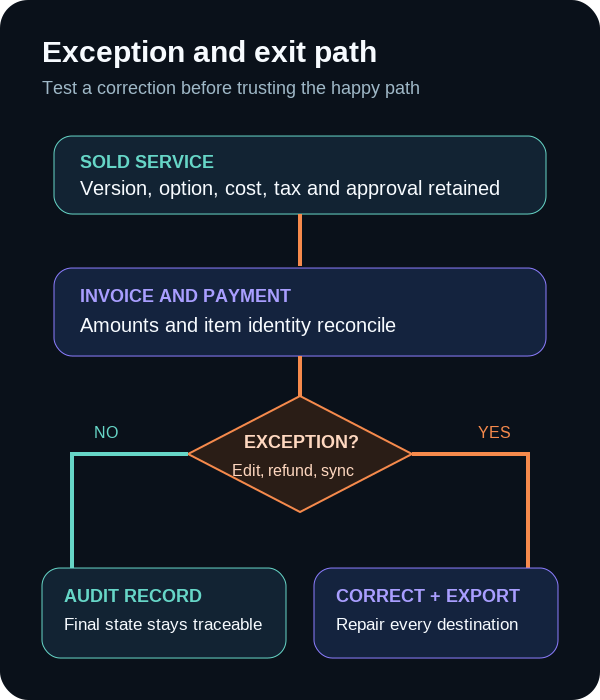
Start with labor, material, overhead and margin inputs that have named owners. Carry the approved service and its options into the field without exposing protected prices to silent edits. Then preserve the sold item through invoice, accounting correction and export.
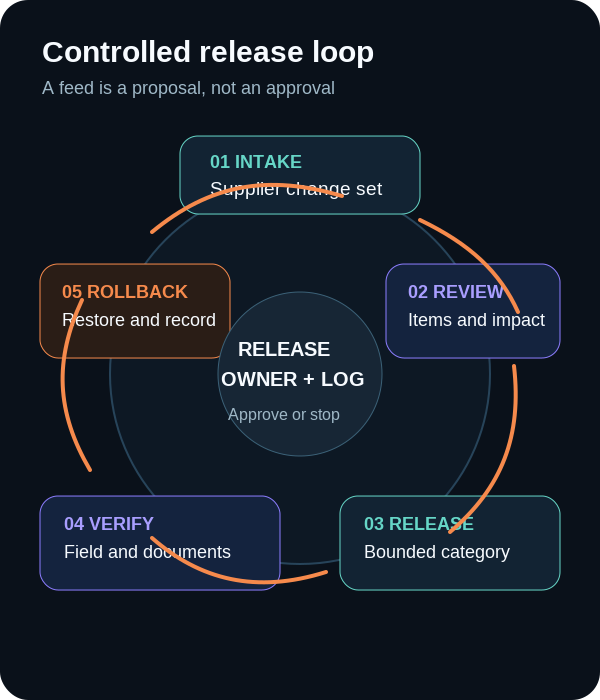
Supplier updates are not automatically safe updates. Review the affected items, release a bounded batch, verify field visibility and open-document behavior, and keep a rollback record. If the vendor cannot show that chain on a representative service, the price book is not ready to become the shop's pricing authority.
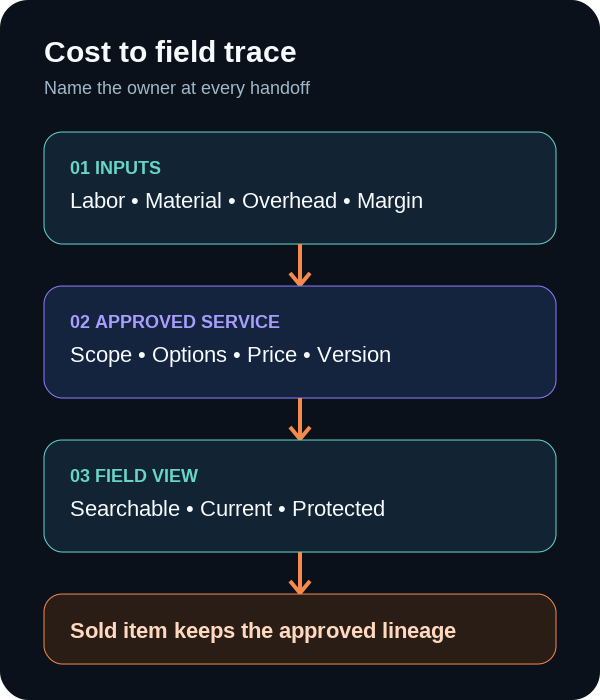
The operating loop the software must protect
Define labor, material, overhead, and target margin
The model should separate what the service costs from what the customer pays and identify who can change either number.
Turn components into a field-ready service
Names, descriptions, categories, images, sold hours, warranties, and attached materials must remain searchable and maintainable.
Present consistent choices on site
The technician should build a clear estimate without browsing an ungoverned catalog or editing protected prices.
Carry the sold item into invoice and reporting
The chosen service must retain the correct revenue, cost, tax, commission, and accounting context.
Update the book without breaking live work
Bulk changes, supplier updates, permissions, and audit history determine whether the price book stays trustworthy.
Research candidates by operating fit
Jobber
Products & Services stores reusable names, descriptions, and unit prices. Select plans add unit cost, markup and images. The current help page documents CSV update and export behavior for the list.
Watch: A CSV update can overwrite stored fields, and QuickBooks sync changes the permitted update path. Verify the current plan, source of truth, permissions and rollback procedure in writing.Open the evidence review ↗Housecall Pro
The 9 July 2026 flat-rate guide documents materials, material markups, labor rates, overhead inputs and service creation inside its price-book workflow.
Watch: The help article is product documentation, not evidence that the quoted plan includes every required control or that a current mobile role can edit safely. Confirm both in the written quote and pilot.Open the evidence review ↗Workiz
The current help article documents reusable items and services for jobs, estimates and invoices, with price, unit cost, category, tax and booking fields.
Watch: The same article says ordinary reusable items do not track stock and points to the Inventory add-on for that function. Confirm inventory scope, export fields and correction ownership before purchase.Open the evidence review ↗ServiceTitan
The 16 October 2026 Pricebook Pro documentation requires a Pricebook Pro subscription and describes Smart Start, Dynamic Pricing review, mobile category visibility, Pricebook Connect updates and management workflows.
Watch: Treat the setup, regional pricing and update statements as vendor documentation only. Confirm subscription, implementation owner, supplier mapping, release controls and component export in writing.Open the evidence review ↗Dated vendor evidence and its limits
Jobber
The current Products & Services help page documents default line items, plan-sensitive unit cost and markup, CSV updates, CSV export and QuickBooks-specific update constraints.
Boundary: Documentation review only. No Jobber account, import, sync or rollback was tested for this refresh.Housecall Pro
The official flat-rate guide describes materials, markups, labor rates, overhead inputs and service creation.
Boundary: The page does not prove the quoted plan, role permissions, mobile behavior or accounting correction path for a particular buyer.Workiz
The official help page documents reusable items and services for jobs, estimates and invoices, including unit cost, category, tax and booking fields.
Boundary: It explicitly separates ordinary items from stock tracking through the Inventory add-on. No account or inventory workflow was tested.ServiceTitan
Pricebook Pro documentation states that a subscription is required and describes Smart Start, Dynamic Pricing review, mobile category visibility, Pricebook Connect updates and additional management workflows.
Boundary: These are vendor-documented capabilities, not proof of plan inclusion, implementation speed, pricing accuracy, plumbing outcomes or ServiceTech hands-on testing.Buyer decision steps before a commitment
Normalize the written quote
List subscription, required add-ons, setup, catalog or supplier services, user and technician limits, term, renewal, support and export access. Do not infer inclusion from a marketing page.
Name owners and roles
Assign the cost model, catalog mapping, approval, field visibility, accounting correction, release and rollback owners. Test a field role against protected values.
Build a representative service
Use labor, common and volatile material, overhead, tax, warranty context and good, better and best options. Record every source field and approval.
Release one supplier change
Review the proposed change, approve a bounded category, confirm which open and historical documents remain fixed, verify mobile visibility and prove rollback.
Reconcile the sold item
Carry one option into job, invoice, payment, refund and accounting. Correct an error and confirm every system shows the intended final state.
Export before commitment
Export services, materials, equipment, categories, cost, price, descriptions, images or references, relationships and audit data separately. Record omissions and a usable fallback.
Stop or do not buy yet when control is missing
- The quote does not identify required price-book, supplier, inventory or implementation add-ons.
- A field role can silently change a protected cost, price, discount or tax treatment.
- A supplier update cannot be reviewed by item, released in a bounded batch or rolled back with evidence.
- Open estimates, completed invoices or accounting records change without an explicit and testable rule.
- The vendor cannot export the components and relationships needed to rebuild or audit the book.
- The team cannot name who owns exceptions after launch.
The demo must prove these controls
| Control | Requirement | Test | Failure signal |
|---|---|---|---|
| Cost and margin | Store labor, material, burden, and target margin separately | Increase one material cost by 12% | The sold price or margin changes invisibly |
| Field search | A tech finds the right service in seconds | Quote a common repair and an uncommon add-on | Free-text items or duplicate services appear |
| Price authority | Role-based control over edits and discounts | Attempt an override from a field role | Protected values can be changed without approval |
| Options | Present clear repair, upgrade, or add-on choices | Build a three-option water-heater estimate | Options require duplicate quotes or manual math |
| Update control | Bulk or catalog changes can be reviewed | Update a category while two estimates are open | Historical or active documents mutate unexpectedly |
| Downstream integrity | Invoice, tax, job cost, and accounting remain aligned | Sell, invoice, edit, refund, and reconcile | A correction produces mismatched records |
Direct-test protocol
Build ten representative services
Include simple labor, material-heavy work, optional upgrades, taxable items, and a warranty task.
Pass when: The office can explain every price input and permission.Run two field estimates
Use the actual mobile devices and require one common repair plus one multi-option replacement.
Pass when: The tech completes both without free-text pricing or office rescue.Apply a supplier-cost change
Change a material across a controlled category and inspect open, new, and historical documents.
Pass when: Only the intended records change and the adjustment is reviewable.Close the accounting loop
Invoice one option, take payment, issue a partial refund, and reconcile the accounting destination.
Pass when: Revenue, tax, payment, refund, and cost remain traceable.Operational proof, not demo applause.
- Median time to build a field estimate
- Percentage of estimates using governed services
- Gross-margin variance by service category
- Price-book items not reviewed within the policy window
- Invoice or accounting corrections caused by item setup
What this draft does not claim.
- No candidate has received a numerical score.
- No vendor outcome or ROI claim is treated as observed evidence.
- Country, plan, device, and add-on availability must be reconfirmed.
- The final verdict waits for the shared pilot and export test.
Watch one documented workflow, then test your own release controls
The title and ServiceTitan channel identity were rechecked through YouTube oEmbed on 21 November 2026. Load the video only if you want to connect to YouTube.
How To Set Up Dynamic Pricing & Automate Your Pricebook
YouTube connects only after you choose to load this video.
Primary sources
- Jobber Products & Services list ↗
- Housecall Pro flat-rate pricing overview ↗
- Workiz items and services ↗
- ServiceTitan core Pricebook Home ↗
- ServiceTitan Pricebook Pro Home, updated 16 October 2026 ↗
- ServiceTitan plumbing flat-rate software ↗
- ServiceTitan Pricebook Pro product page ↗
- ServiceTitan official dynamic-pricing video ↗