Evidence note: Use this review to build a shortlist. We publish a numerical score or final recommendation only after the product completes the same hands-on scenarios and exception tests used for its peers.
The short verdict
Workiz is a credible shortlist candidate for growing service teams that want scheduling, estimates, invoicing, client records, payments, automations, and QuickBooks Online near a phone-heavy intake workflow. The key buying task is to separate the Standard, Pro, or Ultimate subscription from the Genius Phone, Answering, and Marketing products sold separately.
Who it fits
Growing home-service teams with meaningful inbound call volume, an office dispatch role, and a need to keep communications close to jobs and customer records.
Watch closely: The current pricing page requires a quote for Standard, Pro, and Ultimate, while automation limits and advanced operational features rise by tier and communications products are sold separately.
What changed on 21 October 2026
Pricing and the documented answering and automation boundaries were rechecked on 21 October 2026. This refresh adds an assignment decision map, an itemized cost worksheet, exception-owner checks and an official tutorial. It does not claim that every historical source was retested.
The evidence state remains Blocked / Access. The earlier +1-only signup observation is historical, not a restriction observed again today. No authenticated Workiz account scenario was performed. A phone answered, appointment created, technician assigned and exception reconciled are four different observations.
AI answering is not the same as technician assignment
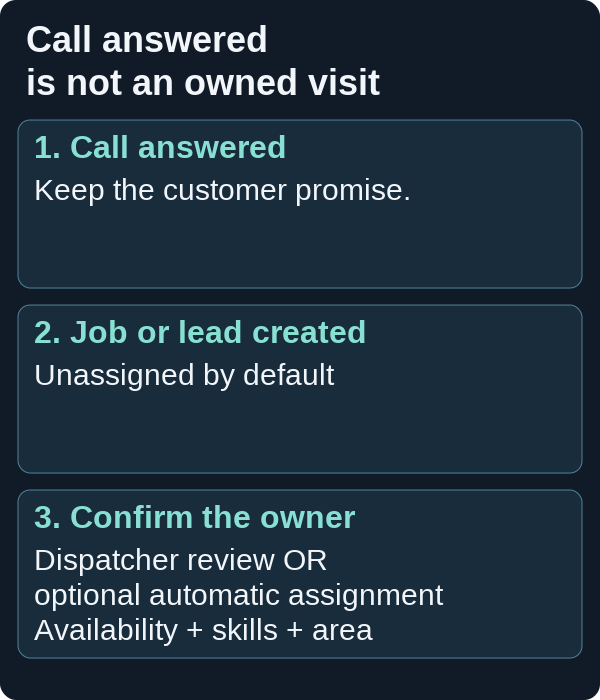
Workiz documents that Genius Answering creates new jobs and leads as unassigned appointments by default. Automatic assignment is optional and uses availability, job-type skills and service areas. Advance notice also affects offered availability. Ask the dispatcher to show the default and intended setting in the exact account you would use. A booked time alone does not demonstrate that a technician owns the visit.
Keep a proposed demonstration small: one eligible request, one outside the service area and one with no suitable technician. Use authorized fictional details. Before each case, record the expected owner and permitted action; afterward inspect what the caller hears, which record exists and who owns follow-up. Leave actual outcomes blank until observed. These are buyer checks, not tests completed by ServiceTech Signal.
For partial handoffs, retain the original request reference and customer promise beside the job or lead ID. A dispatcher should be able to explain why a record remains unassigned and name the next person to review it. An appointment on a calendar is not a substitute for that handoff.
Price the answering workload, not just the software tier
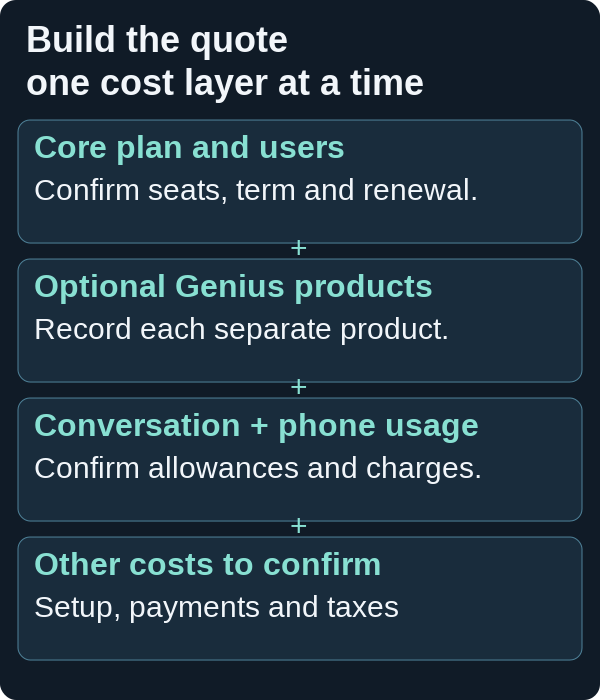
The current pricing page presents quote-based Standard, Pro and Ultimate with 5, 10 and 30 automations respectively. Genius Phone, Answering and Marketing are listed separately. Its FAQ advertises a seven-day trial without a credit card. Request a dated itemized quote rather than an old third-party rate card; a trial feature list does not establish the eventual paid setup.
AI conversation usage also consumes minutes or texts. AI on-demand first requires general phone on-demand, and usage can add charges. If conversations run out without an upgrade or on-demand, the answering step is skipped for the next configured call-flow step, which may be voicemail or a team member. Obtain allowances, extra-usage rates, charge controls and the fallback owner in writing. This is not an instruction to enable paid usage.
| Cost layer | What to retain | Confirmed value / reference |
|---|---|---|
| Core plan and users | Plan, included roles/seats, term and renewal basis. | __________ |
| Optional Genius products | Each included, separate or trial-only item. | __________ |
| Conversation and phone usage | Allowances, extra usage, controls and responsible owner. | __________ |
| Other applicable costs | Implementation, migration/training, payments, taxes and exit assistance. | __________ |
Separate fixed subscription amounts from optional and usage-sensitive lines. Keep the quote date, currency, region, renewal terms and assumptions together. Use the pricing method and cost calculator for your confirmed inputs, not a revenue or savings prediction.
Four boundaries to check before relying on automation
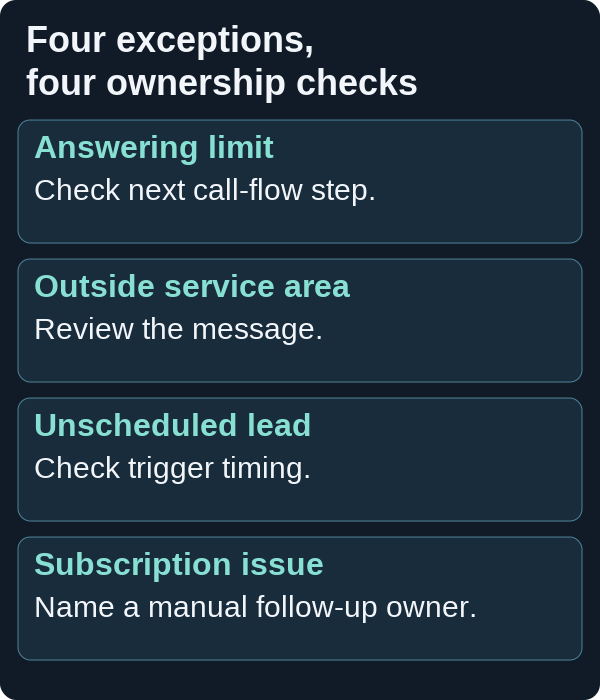
| Boundary | Documented mechanism | Buyer check |
|---|---|---|
| Answering capacity | Concurrent-call and monthly-conversation limits can cause the answering step to be skipped. | Demonstrate the next call-flow step and name who monitors it. |
| Service-area restriction | When enabled, the defined boundary is strict; outside callers are directed to leave a message. | Use an authorized inside/outside fictional address pair and inspect the records. |
| Unscheduled lead | The documented unscheduled-lead trigger is immediate; a time-based lead rule requires scheduling. | Do not assume delayed follow-up covers every unscheduled enquiry. |
| Subscription payment | Subscription payment failure can temporarily disable automation rules. | Assign a billing-alert owner and manual follow-up fallback. |
These are independent checks, not one automatic sequence. They do not demonstrate delivery, duplicate prevention, successful recovery or commercial results in our account. Review the intended channel and customer-contact authority before a safe evaluation; do not place real customer calls or send messages solely to fill this worksheet.
Name the exception owner before the demo
- Who reviews appointments without an assigned technician, and by what agreed time?
- Who checks the next call-flow step when the answering limit is reached?
- Which quoted charges are fixed, optional, usage-based or charged again at renewal?
- How will the team reconcile the customer promise, appointment, technician owner and follow-up task after an exception?
Write one unresolved question, responsible person and next review time for each case. Do not mark a lead handled just because an AI interaction or automation event appears. The required finish is a reconciled operational record with an appropriate next action, not an assumed successful customer outcome.
Official automation-rule tutorial
Creating Workiz Automation rules
YouTube connects only after you choose to load this video.
The official automation guide is the source context. The normal YouTube link above remains available if the embedded player cannot load.
Use this review for fit, then run the controlled checks
Keep implementation detail with the existing Workiz workflow protocol. Use Housecall Pro versus Workiz for that pair and ServiceTitan alternatives for a broader shortlist. The accounting handoff guide and software pilot retain their distinct scope.
Method and evidence limits
Current pricing and the six linked answering/automation help pages were reviewed on 21 October 2026. The diagrams, blank quote record and evaluation questions are editorial aids. Earlier useful sources and access history remain below. No signup, account action, payment, communication, automation or recovery was exercised today. Vendor documentation and video do not establish regional access, reliability, a score, ranking, sales or a universal recommendation.
Decision by operating profile
Use these profiles as a screening gate before a paid rollout. A strong fit still requires the controlled checks and written commercial evidence below.
A dispatcher-led team with substantial phone intake
- Calls, messages, leads, estimates, jobs, and invoices need one visible customer history
- The office can own exceptions while technicians work from assigned jobs
- A written quote separates the core subscription from every Genius product and payment cost
A growing team replacing several disconnected tools
- The intended plan covers the exact scheduling, reporting, automation, and accounting controls
- Imports are rehearsed with synthetic records before financial history is moved
- The team receives written confirmation for its region, phone, and payment requirements
A self-serve or international buyer that cannot access the intended account
- Signup or core communication features require an unsupported phone or market
- The quote does not itemize seats, add-ons, implementation, renewal, and usage costs
- Complete records, files, communications, configuration, and audit history cannot be retrieved at exit
Small-team buying map
This map is a starting point, not a plan recommendation. Confirm current prices, included users, regional availability, and the exact workflow in a trial or vendor-led evaluation.
| Operating profile | Starting point | Why it belongs in the test | Stop signal |
|---|---|---|---|
| Growing team needing core FSM | Quote Standard | The public plan table places scheduling, jobs, estimates, invoices, payments, client records, service areas, reports, custom fields, subcontractors, and QuickBooks integration in the baseline tier. | Stop if the written price, included users, regional availability, or communications add-ons make first-year cost unclear. |
| Phone-heavy dispatcher operation | Quote Pro plus exact Genius products | Pro raises the automation allowance and adds custom reporting, performance pay, and Genius lead and scheduling capabilities. | Do not proceed until phone, recording, consent, registration, usage, AI transfer, and overage costs are confirmed. |
| Multi-location or process-heavy company | Evaluate Ultimate | Ultimate is the documented checkpoint for service plans, inventory, flat rate, checklists, multi-day jobs, API access, equipment, purchase orders, and franchise controls. | Pause if permissions, API limits, implementation ownership, migration, or exit cannot be demonstrated. |
Pricing and plan gates
The current official page presents quote-based Standard, Pro, and Ultimate plans. It documents 5, 10, and 30 automations respectively, unlimited jobs, invoices, estimates, and clients, plus separately sold Genius Phone, Answering, and Marketing products. Require a dated written quote for the subscription, users, usage, implementation, payment costs, taxes, and renewal.
Evaluation access: The official pricing FAQ states a 7-day free trial with no credit card; confirm which plan and add-ons are enabled before testing.
- Standard is the baseline for scheduling, jobs, estimates, invoices, payments, customer records, service areas, built-in reports, custom fields, subcontractors, and QuickBooks integration.
- Pro is the first checkpoint for performance pay, custom reports, Genius lead and scheduling features, and ten automations.
- Ultimate is the relevant checkpoint for service plans, inventory, flat-rate workflows, checklists, multi-day jobs, API access, equipment, purchase orders, and thirty automations.
- Require a written subscription price, included seats, and extra-seat formula for the intended term.
- List Genius Phone, Answering, Marketing, payments, and every other optional product as separate TCO lines.
Questions to put in writing before buying
Record the answers beside the dated quote. If a required answer is unavailable, keep the decision conditional.
- What are the subscription, user, setup, migration, training, support, tax, and renewal amounts for the exact term?
- Which Genius, payment, financing, card-reader, messaging, and AI capabilities are included, trial-only, usage-priced, or sold separately?
- Which numbers, languages, recording and consent controls, registration requirements, and services are available in the operating region?
- Which role can create, reassign, edit, close, invoice, correct, export, and delete each required record?
- How are edited invoices, deposits, refunds, failed payments, and QuickBooks changes reconciled without duplication?
- What exports require support, what is excluded, how long is data retained, and what remains accessible after cancellation?
Strengths and constraints
The strongest documented signals
- Standard documents scheduling, jobs, estimates, invoices, payments, client management, service areas, reporting, and QuickBooks integration
- Pro adds performance pay, custom reporting, and a higher automation allowance
- Ultimate adds service plans, inventory, flat-rate tools, checklists, multi-day jobs, API access, equipment, and purchase orders
- Job-connected estimates and invoices can preserve items and payment context
- Phone-led job creation and missed-call automation can connect intake to booking
The constraints to price and test
- The earlier signup attempt accepted only +1 phone numbers for this researcher. That historical access restriction remains unresolved in our evidence, not retested today.
- Current subscription prices require a sales quote
- Genius Phone, Answering, and Marketing are sold separately
- Automation capacity is documented as 5 on Standard, 10 on Pro, and 30 on Ultimate
- Vendor-assisted imports may take one to two weeks, and Workiz advises against importing transactions when planning a QuickBooks Online connection
What we still need to test
- Run a missed-call-to-booked-job scenario with consent, opt-out, and after-hours handling.
- Reschedule and reassign an urgent job from desktop and mobile.
- Reconcile one edited invoice, one safe synthetic payment boundary, and one QuickBooks-originated change.
- Import a representative customer and item set before any production transaction import.
- Export all required records, files, communications, permissions, automation history, and configuration before commitment.
Evidence sources
- Workiz pricing, plan gates, separate Genius products, and trial ↗
- Workiz product and feature overview ↗
- Workiz price-book workflow ↗
- Workiz line-item markup controls ↗
- Workiz schedule overview ↗
- Workiz and QuickBooks Online sync directions ↗
- Workiz data-import process and warnings ↗
- Workiz job-connected estimate and invoice behavior ↗
- Workiz custom-report PDF and CSV export ↗
- Workiz assignment: documentation checked 21 October 2026 ↗
- Workiz capacity: documentation checked 21 October 2026 ↗
- Workiz usage: documentation checked 21 October 2026 ↗
- Workiz area: documentation checked 21 October 2026 ↗
- Workiz leads: documentation checked 21 October 2026 ↗
- Workiz automation: documentation checked 21 October 2026 ↗
Editorial record
Who reviewed this page and what happens next.
Commercial relationships cannot change the evidence state, fit statement, caveats, or conclusion.
- Research and review
- Andre Ribeiro
- Published
- Last material review
- Next scheduled review
- Evidence scope
- US-oriented evidence desk; verify country, phone, payments, and tax availability
- Evidence state
- Blocked / Access
Testing methodologyEditorial standardsCorrections and update log