The client wants the inside of the oven cleaned this Friday only. Where do you put the extra charge? On the visit, not on the recurring service agreement. Then check two records that the calendar cannot vouch for: the draft bill for Friday and the work order for the next clean. A correct-looking calendar entry can still produce a missing charge or another oven clean the customer never ordered.
This buyer’s guide compares what Jobber, ZenMaid and BookingKoala actually document. It includes a test you can run before choosing a system or changing a live job. It is not a report of a completed product test.
First decide what stays the same
Imagine that Elm House pays $120 per weekly clean. The customer approves an extra $35 for the oven on visit B, the middle of three visits. They have not approved more work for visit C. The figures below are illustrative and before tax; they are not vendor prices.
| What the office should see | Visit A | Visit B | Visit C |
|---|---|---|---|
| Crew instructions | Regular clean | Regular clean + inside oven | Regular clean |
| Service amount under per-visit billing | $120 | $155 | $120 |
| On the customer's bill | No oven charge | One $35 oven charge | No oven charge |
Across the three visits the expected service subtotal is $395. But a $395 total alone is not a pass: charging $35 on visit C instead of visit B leaves the amount right and the customer's record wrong.
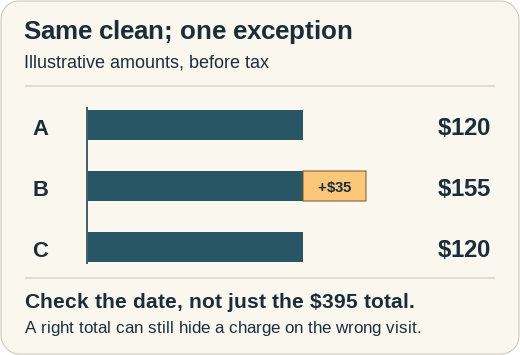
If you're on a flat monthly contract, do not apply that $395 test. The scheduled installments belong to the contract, not to the number of visits that month. First establish whether the oven is already included. If it is, the crew may need a new instruction but the customer owes no extra. If it is separately chargeable, keep the installment intact and reconcile the one approved $35 addition through your agreed billing process.
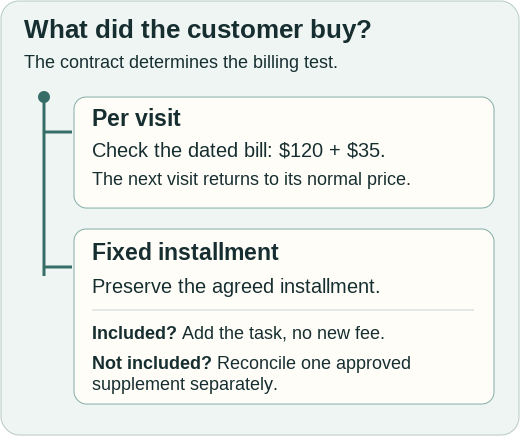
Which booking software matches the way you bill?
| What you need | What the vendor documents | What to see before choosing |
|---|---|---|
| Jobber: add an item on a field-service visit | A recurring job supplies the standard line items. The office can edit one visit and add a service without changing the others. Jobber explicitly warns that a custom visit item on a fixed-rate billing job does not transfer to the invoice. Recurring jobs · Visit line items | Ask the demonstrator to produce the draft bill using your billing method, rather than stopping at the calendar. For a fixed-rate contract, have them show where the authorized supplement is recorded exactly once. |
| ZenMaid: change one appointment in a cleaning series | ZenMaid documents opening an individual appointment from the series and saving changes that affect only that occurrence. Appointment setup has a work-items section and a before-tax billing amount; invoicing can start from the selected appointment. Single-appointment edit · Appointment fields · Invoicing | Check what the cleaner sees and what explains the extra to the customer. A price of $155 is not, on its own, a work instruction or an itemized explanation. |
| BookingKoala: apply a pricing rule at intake | Its Form 1 pricing documentation distinguishes parameters that apply to every booking from ones that apply only to the first appointment. Its scheduling settings can generate later bookings from different source bookings. Pricing parameters · Recurring schedule settings | A first-clean price is not proof of a mid-series override. Ask for the oven example on the middle visit, and inspect a newly generated future occurrence under your actual settings. |
If your risk is an unbilled extra on a monthly agreement, prioritize a demonstration of billing. If cleaners take requests on site, prioritize the handoff: who can request a change, who checks the customer's approval, and who can change the charge? For example, ZenMaid's mobile permissions distinguish owners and office managers who may edit appointments from cleaners who cannot edit appointment prices. That can be a useful control if the cleaner has a clear way to reach the office.
Watch the visit edit: Set Up a Custom Visit with Jobber | Jobs — Jobber Help Center accompanies the vendor's instructions for a custom visit. Use it to see where the visit edit happens, not as evidence that an extra reached an invoice. For that, use your own billing arrangement in the test below.
Set Up a Custom Visit with Jobber
YouTube connects only after you choose to load this video.
The three-visit acceptance test
Use a demo or isolated test account, a fictitious client and no saved card. Turn off customer notifications, payment collection and accounting sync for the exercise. If the demo cannot isolate them, ask for a screen-share with sample records; don't test on a paying household.
- Keep the baseline. Create the three weekly visits with the same base scope. Record the visit identifiers, intended billing method and the standard amount. Open the recurring agreement and capture its initial state.
- Change the middle visit. Record the oven request, the one approved date and the $35 supplement. In the normal office role, update only visit B. Reopen B from the schedule rather than trusting a save message. Does the cleaner see the oven in the work instructions?
- Preview what would be billed. Open the unsent draft or preview appropriate to your billing arrangement. Can the office identify the date, reason and single addition? Under per-visit billing, compare the three figures. Under fixed billing, check that the base installment did not move and the supplement was not added twice.
- Inspect the next occurrence. Reopen visit C and the series template. Neither should inherit the oven. If more visits are created later by a scheduler, also inspect the first newly generated one, not just the next appointment already on screen. If you cannot observe that within the demo, mark it not verified.
- Test a withdrawal before the bill is sent. In the same sample, withdraw the oven request and remove the exception. Expect the work instruction and the unsent charge to disappear from B, with A, C and the original agreement unchanged. Preserve a reason for the change. This is not a procedure for correcting or deleting an issued invoice.
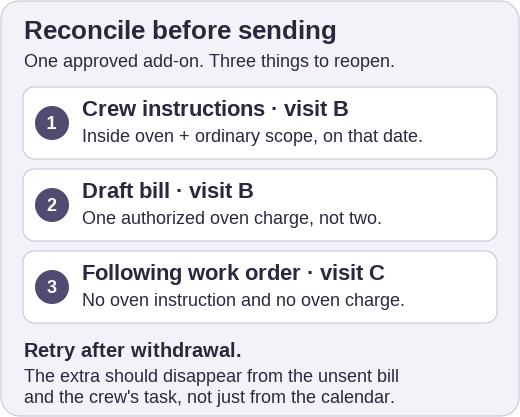
Keep this as your acceptance record: visit ID / approved scope and date / standard amount / one-off amount / crew view / draft bill / next visit / reviewer / pass, fail or not verified. Ask the person who normally prepares the bill to sign off; a dispatcher and a bookkeeper may look at two different records for the same visit.
When not to buy another tool
A solo cleaner with occasional extras may need no new subscription. Record the customer’s approval, place the dated task on the work order, add it to the unsent bill, and check the following visit. Consider dedicated software when the office, crew and bookkeeper can no longer make that handoff reliably. A good sales demo ends with the next ordinary clean back at its ordinary price.
For a broader shortlist, see software for cleaning businesses. If the customer wants to change the underlying agreement, use the scope-change workflow. If they want to miss the visit entirely, that is a different case: skipping one recurring service visit.